
Lighting console · Media server
Every light. Every screen.One system.
A lighting console and a media server in one application. Program fixtures, fire looks, and run video from the same show file — locked to the same track.
Patch/Rig flown in. Fixtures parked dark.
Aim at the room.Not at a channel.
Programming a rig is a spatial problem, so ScreenLight gives you the space. A full-quality 3D model of the venue to work in, and one patch underneath it.
Point to aim
Click a head, then the spot. Pan and tilt solve themselves.
Build the room
Decks, walls and truss at the venue's real size.
Light the hour
Day, night and haze — the look you will actually run.
Split to program
Stage on one half, programmer on the other.
The show follows the track.Not a cue list.
Load a song. The waveform is the chart. Drag a look and snap it to the beat. No cue numbers or complicated setup.
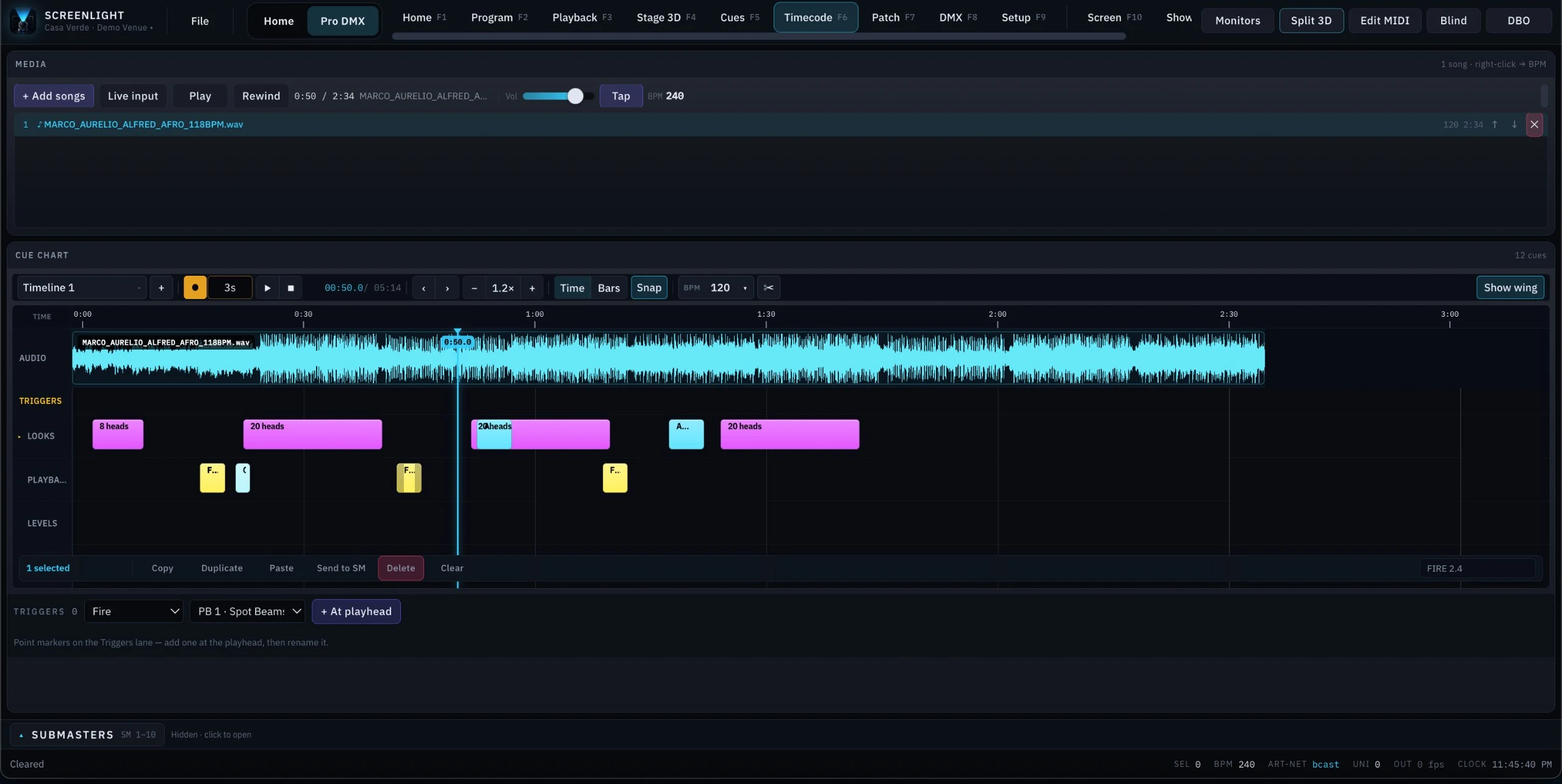
Record at the playhead
No cue numbers to keep. Mark the moment and it is on the chart.
Edit like a video editor
Drag, trim, split and snap. Looks, playback and triggers each get a lane.
Chase, or tap
Lock to LTC, or tap the tempo by hand. Same chart either way.
Art-Net · HDMI · MIDI
Runs on the rigyou already own.
ScreenLight reaches your rig over open standards, not over hardware of ours. Art-Net travels on ordinary Ethernet, and any Art-Net node already in your rack bridges it straight to DMX512. The screens leave the same machine — an LED processor, a TV on a plain HDMI cable, or an extender fanning one source across the venue. Nothing proprietary to buy, rack or carry to the gig.
MIDI
Map any controller to any control.
The surface under your hands is yours to choose. Plug in whatever you already own — a pad grid, a knob box, a fader wing — and teach it the show in the time it takes to move the knob.
Nothing is typed
Open Edit MIDI, move the physical control you want bound — note, CC or pitch-bend, it doesn't matter — and it's mapped.
Every control is reachable
Playback, submasters, the grand master, blackout, tap tempo, highlight, blind: if it is a button or a fader in ScreenLight, a MIDI surface can fire it.
No surface is privileged
A $50 pad and a $10,000 desk's buttons arrive as the same MIDI message. Buy the surface that fits your booth, not the one that fits our software.
Venues · Home mode
Your staff run the room.Nobody has to learn lighting.
The programmer is not there on a Tuesday. Home mode is: named buttons instead of a patch. Press Dinner, and the lights and screens change together.
- Clubs
- Restaurants
- Bars
- Hotels
- Event spaces

Home / Pro DMX is one click. The switch sits beside the venue name in the title bar of the desktop application, on every page. One machine, one show file, two faces.
- 01
A programmer sets it up once
Builds the looks, routes the screens, hands the room over.
- 02
Your staff press a named moment
Doors. Dinner. Live set. Not fixtures, not a patch.
- 03
Nothing can be broken from the floor
They can run the night. They cannot edit the show.
Lights and screens move together
One scene is both. Video is not somebody else's job.
It is running before anyone arrives
Launch at login. The console is up before the doors are.
Next · iPad
Take Home off the machine and put it behind the bar.
Home already gives your staff a face they can use. The next step is getting it off the venue PC and onto a tablet they can carry — the same scenes, the same screen routing, the same show file, in a hand.
The tablet beside this is a mockup of that interaction, not a build. Press a scene and watch the room follow — that is the whole idea, and it is the part we are building next.
In developmentMockup of the venue app. Press a scene.
Licensing
Licensed by the term, not the show.
One product, one price. Plans differ by how long you licence it for and nothing else — no tier holds a module back, no output is metered, and no show is counted. Longer terms cost less per month.
Monthly
$45
Billed monthly
$45/mo effective
Short-term productions and one-off shows.
Semi-annual
$240
Billed every 6 months
$40/mo effectiveSave 11%
Seasonal venues and recurring residencies.
Annual
Best value$420
Billed every 12 months
$35/mo effectiveSave 22%
Permanent installs and full-season touring.
Your license activates the moment payment clears. Taxes are calculated at checkout by our merchant of record.
In every plan
The whole application
Programmer, media server, Stage 3D, timecode and show control. No module is held back on a shorter term.
Every device class
Moving heads, LED walls, TVs, light strings, projectors and house screens.
Every protocol
Art-Net, sACN, DMX512, MIDI in, HDMI and DisplayPort out, audio in.
2 activated devices
Deactivate and move a seat yourself, from your account, whenever you need to.
72-hour offline grace
The application keeps running for 72 hours without a connection, so a venue with bad networking is not a problem.
Point releases and patches
Updates arrive inside your term at no extra cost, with priority support behind them.
Bring the whole rigunder one hand.
One application for the lights, the screens and the night they run. Patch a universe and you are programming in minutes.
- 01
Create an account
Your licence, your seats and your downloads all hang off it.
- 02
Pick a term
Every plan is the full application. Longer terms cost less per month.
- 03
Download and activate
Signed installers, released against your licence. Sign in on first launch.